
108 lines
5.1 KiB
Markdown
108 lines
5.1 KiB
Markdown
# Overview
|
||
|
||
Build bootable macOS installer ISOs and DMGs directly from Apple's servers — no Mac required.
|
||
|
||
This project has two parts:
|
||
1. A script (`mkmaciso`) that uses only macOS built-in tools and commands to download and install the full macOS installer from Apple's servers into **/Applications**, and then creates bootable ISO/DMG images.
|
||
2. GitHub Action workflows that run `mkmaciso` on Azure datacenter-hosted Mac minis if you don't have macOS.
|
||
|
||
## Before you start
|
||
|
||
Check [Release page](https://github.com/LongQT-sea/mkmaciso/releases/latest) first - someone might've already built what you need. If not, see [How to use](#how-to-use) to build your own.
|
||
|
||
> [!Important]
|
||
> GitHub-hosted runners are a free public resource — please use them responsibly.
|
||
|
||
## Disk Image Formats
|
||
|
||
| | ISO | DMG |
|
||
|---|---|---|
|
||
| Best for | Virtual Machines | Bootable USB |
|
||
| VM Support | Attach as virtual DVD | Attach as virtual hard disk |
|
||
| Layout | Hybrid UDF/HFS | Raw GPT disk image |
|
||
|
||
**ISO files** - These work great for VMs *(Proxmox, QEMU, VirtualBox, VMware)*. Just attach them like a virtual DVD. They'll even mount in Windows if you need to poke around inside.
|
||
|
||
**DMG files** - Flash these to a USB drive with [Rufus](https://rufus.ie/en/#download) *(Windows)*, `dd` *(Linux)*, or `asr` *(macOS)* to make bootable installation media. For VM use, convert them to `.vhd` *(for Hyper-V)* or `.vmdk` *(for VMware)* with `qemu-img`. QEMU/Proxmox can use the raw disk image without conversion.
|
||
> Note: DMG files ship with a `.img` suffix *(e.g. macOS_Sequoia.dmg.img)* so Rufus can find them without switching to "All files" in Explorer.
|
||
|
||
## Supported versions
|
||
|
||
Pretty much everything from OS X Lion (10.7, 2011) through the latest macOS Tahoe (26, 2025). Full list:
|
||
|
||
Lion, Mountain Lion, Mavericks, Yosemite, El Capitan, Sierra, High Sierra, Mojave, Catalina, Big Sur, Monterey, Ventura, Sonoma, Sequoia, Tahoe.
|
||
|
||
---
|
||
|
||
## How to use
|
||
|
||
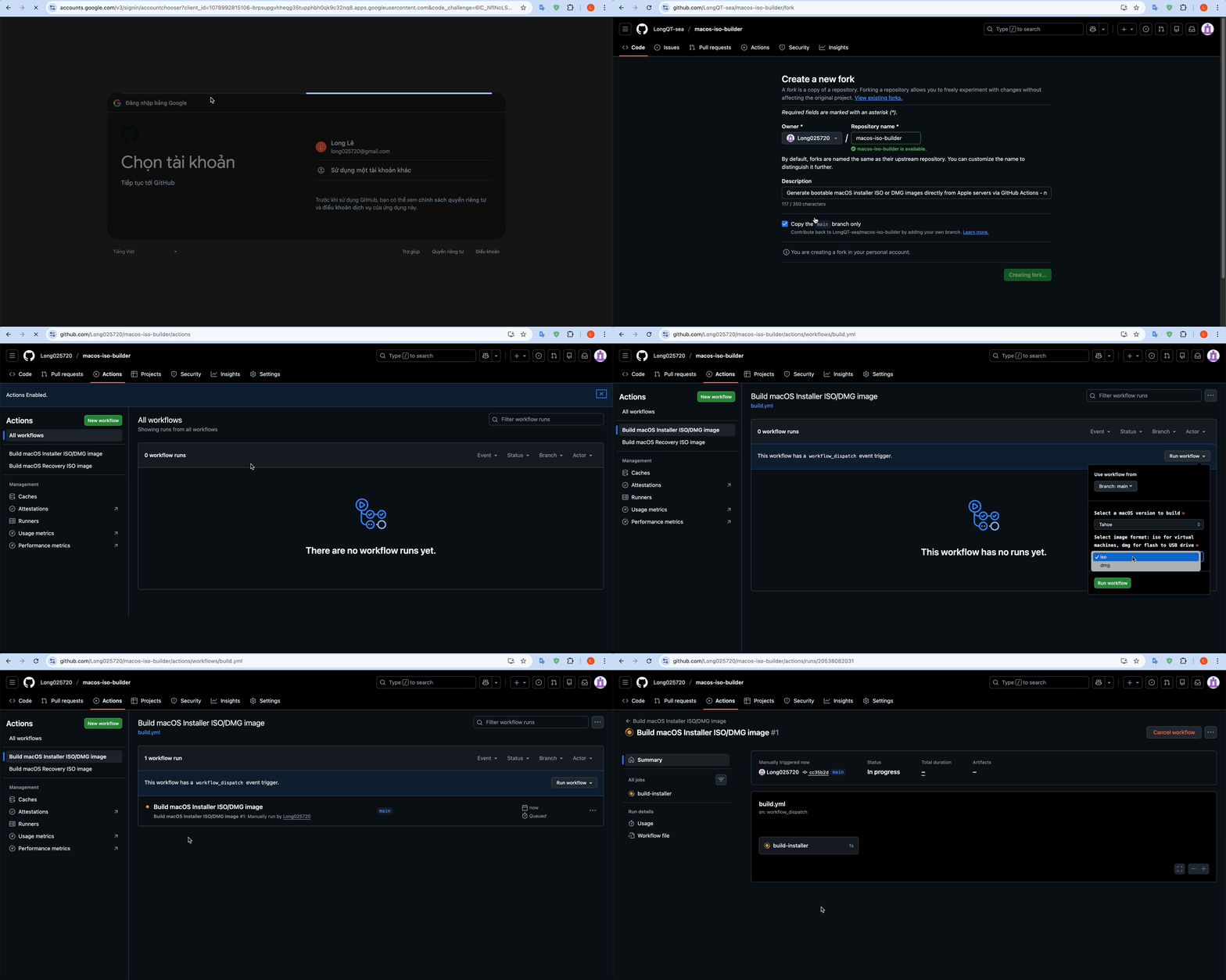
### Don't have macOS? Use GitHub Actions
|
||
|
||
> [!TIP]
|
||
> <details>
|
||
> <summary>Click here to watch a visual guide (GIF)</summary>
|
||
>
|
||
> 
|
||
>
|
||
> </details>
|
||
|
||
1. [Click here](https://github.com/LongQT-sea/macos-iso-builder/fork) to Fork this repository (requires a GitHub account).
|
||
2. Navigate to the **Actions** tab in your forked repository.
|
||
3. Click the green **"I understand my workflows, go ahead and enable them"** button.
|
||
4. Select a workflow from the left sidebar:
|
||
* **Recovery ISO** *(recommended)* - Small recovery image, builds in 2-5 minutes. Good for VMs.
|
||
* **Full Installer** - Complete offline installer, 5-18GB, takes 5-60 minutes to build.
|
||
5. Click the **"Run workflow"** button and configure the workflow inputs:
|
||
|
||
* **macOS version** – Choose a version (*Sequoia*, *Sonoma*, etc.).
|
||
* **Image format** – Choose `iso` for virtual machines or `dmg` for bootable USB drives.
|
||
6. Click the green **"Run workflow"** button to start the build, then wait for the workflow to complete.
|
||
7. Once completed, reload the page and scroll down to the **Artifacts** section. Click the artifact link to start downloading (e.g., `macOS_Sequoia_15.7.4.iso`).
|
||
8. **Recovery ISO** artifacts are zipped — unzip before use.
|
||
|
||
---
|
||
|
||
### Already have macOS? Run `mkmaciso` locally
|
||
|
||
Quick run using Terminal.app (change `tahoe` to whatever you want):
|
||
```bash
|
||
curl -s https://raw.githubusercontent.com/LongQT-sea/mkmaciso/main/mkmaciso | bash -s tahoe
|
||
```
|
||
|
||
Or download the script first, then run with parameters:
|
||
```bash
|
||
curl -O https://raw.githubusercontent.com/LongQT-sea/mkmaciso/main/mkmaciso
|
||
chmod +x mkmaciso
|
||
./mkmaciso --help
|
||
```
|
||
|
||
Running `./mkmaciso` without arguments gives you an interactive menu.
|
||
|
||
---
|
||
|
||
## Tips
|
||
|
||
For VMs, just attach the ISO as a virtual CD drive. Proxmox users — if you want better performance, look into GPU passthrough. I have another repo ([OpenCore-ISO](https://github.com/LongQT-sea/OpenCore-ISO)) that might help with installation, and one for [Intel iGPU passthrough](https://github.com/LongQT-sea/intel-igpu-passthru) specifically.
|
||
|
||
For bootable USB drives, after you flash the DMG there will be leftover space on the drive. You can use that to create a FAT32 partition for your EFI folder if you need one.
|
||
|
||
If you're using `dd` on Linux, triple-check your target device. `dd` doesn't ask for confirmation.
|
||
|
||
## Requirements for mkmaciso
|
||
|
||
- macOS 10.9 or newer (11+ is better)
|
||
- Intel Mac recommended, Apple Silicon works but with some limitations
|
||
- 20-40GB of free space while building
|
||
- Internet connection
|
||
- sudo access
|
||
|
||
## Credits
|
||
|
||
Apple for macOS and their update servers, [Mavericks Forever](https://mavericksforever.com/) for documenting the Mavericks recovery protocol, and the [InsanelyMac community](https://www.insanelymac.com/forum/topic/338810-create-legit-copy-of-macos-from-apple-catalog/) for their research on downloading macOS directly from Apple's catalog.
|
||
|
||
## Legal stuff
|
||
|
||
This tool downloads macOS images directly from Apple's official servers. Users are responsible for complying with [Apple's Software License Agreement](https://www.apple.com/legal/sla/). macOS is a trademark of Apple Inc.
|
||
|
||
Licensed under GPLv3.
|